
Global Configuration
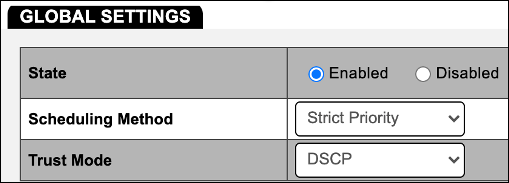
- Log into the switch and navigate to Advanced > QoS > Global Settings.
- Change the State to Enabled.
- Verify the Scheduling Method is set to Strict Priority.
- Set Trust Mode to DSCP.
Dante Configuration
- Navigate to Advanced > QoS > DSCP Mapping.
- Set DSCP 0 through DSCP 63 to Queue 1. This ensures all unused DSCP values are at the lowest priority.
Note: If it is unlikely that another DSCP application will be operating on the network, setting all other values to Queue 1 can be skipped.
- Set DSCP 8 to Queue 3. This is for Low priority “reserved” usage.
- Set DSCP 46 to Queue 7. This is for Medium priority Audio traffic.
- Set DSCP 56 to Queue 8. This is for High priority PTP timing traffic.
- Click Apply.