
alexa-setup-guide-rev-c.pdfalexa-quick-start-guide-rev-b.pdf
Q: How do I connect an Amazon Alexa device to my Control4 Smart Home?
A: Read the Alexa Quick Start Guide (ctrl4.co/alexa-help) or watch the Connecting Amazon Echo to Control4 video (ctrl4.co/alexa-videohelp) to learn how to connect your Amazon Alexa device to your Control4 Smart Home.
Q: What Amazon Alexa devices will work with my Control4 Smart Home?
A: The Echo Dot (including 3rd Gen), Echo (including 2nd Gen), Echo Plus (including 2nd Gen), Echo Spot, Echo Show (including 2nd Gen), Fire TV Stick 4K, Fire TV Stick, and Fire TV Cube.
Q: Do all Control4 systems work with Alexa devices?
A: You need a 4Sight subscription for your Control4 system to work with Alexa. Also, the system must be running Control4 OS 2.8.2 or greater.
Q: In what countries can I use the Control4 Smart Home Skill?
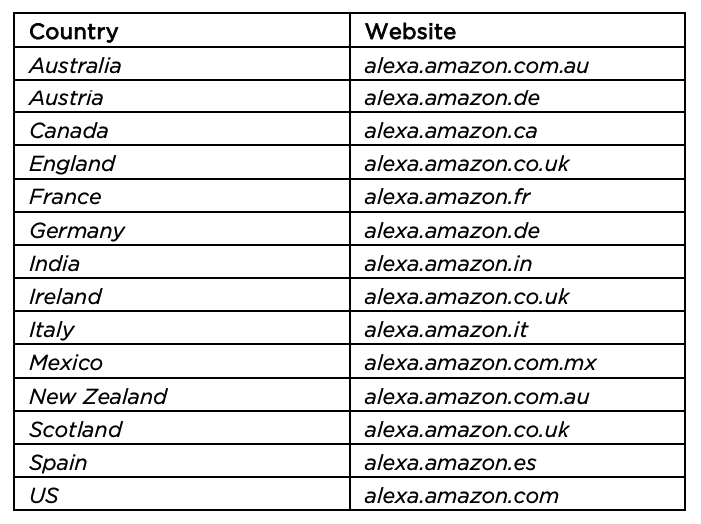
A: You can use the Control4 Smart Home Skill in Australia, Austria, Canada (English and French), England, France, Germany, India, Ireland, Italy, Mexico, New Zealand, Scotland, Spain, and the US.
Q: If I don’t already have an Amazon account, where do I go to create one?
A: Create an Amazon account at your region-specific Amazon site, listed below. Or, if you have an account already, you can change your country settings in your Amazon account settings.
Q: What devices in my Control4 Smart Home will I be able to control using voice commands?
A: Initially, you can use voice commands for all your lights, lighting scenes, thermostats, locks, fans, room volume, and video devices. You can control more items in your house by contacting your dealer to set up whole-home scenes for you.